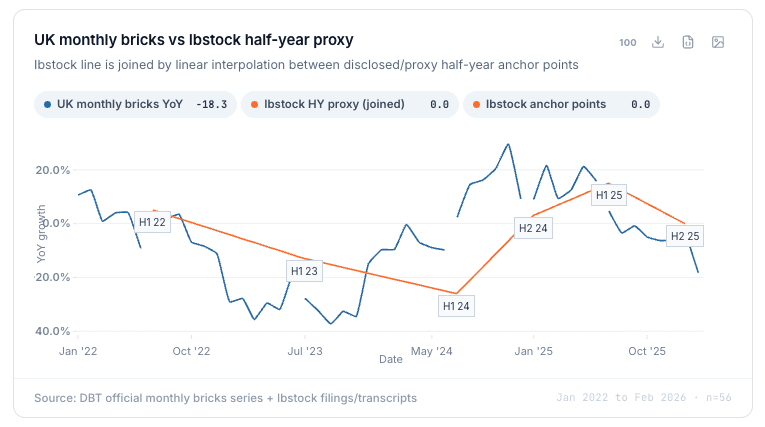
What changed
We added data tools to Studio. Primer can now find data, clean it, compare it with company numbers, and make charts.
Why it matters
You can use outside data without doing lots of work in Excel.
We added data tools to Studio. Primer can now find data, clean it, compare it with company numbers, and make charts.
You can use outside data without doing lots of work in Excel.
Primer now gives investment teams a data layer built for the way research actually happens. Bring in data from almost anywhere; websites, APIs, proprietary files, Excel uploads, and Primer’s own catalogue of hundreds of thousands of financial, market, and macro series, then store it permanently in your workspace.
Once added, data can be attached to the right companies, transformed by the agent, and used across models, notes, charts, alerts, and research workflows. No Excel detours. No disconnected files. Just data in context.
Start with Primer’s catalogue or ask the agent to get the dataset you need.
Primer now gives you access to hundreds of thousands of financial, market, and macro series out of the box: global equities, intraday and historical prices, bonds, yields, commodities, FX, crypto, and 10,000+ curated macro series.
Need something more specific? Ask Primer to fetch it. The agent can scrape data from the web, connect to APIs, or ingest uploaded files, including Excel. It structures the data, saves it to your workspace, and keeps it updated.
Clean, combine, query, and calculate without spreadsheet work.
Once a dataset is in Primer, it becomes a persistent data item in your workspace. The agent can clean it, join it, aggregate it, smooth it, calculate year-on-year growth, build an index, create a composite, or transform it with SQL.
No spreadsheet wrangling. No table UI. Just describe the output you need, and Primer turns the raw data into something usable.
Models, notes, charts, alerts, and company workflows, all with the right data in context.
Data in Primer does not live as a detached file. It sits next to the companies, models, notes, and workflows it supports.
Use it to inform a model, support a note, generate a dynamic chart, trigger an alert, or give the agent a reference point whenever it works on that company again. You can still export it when needed, but the default is that the data stays connected to the company, the agent, and the workflow.