Best AI Tools for Financial Modeling
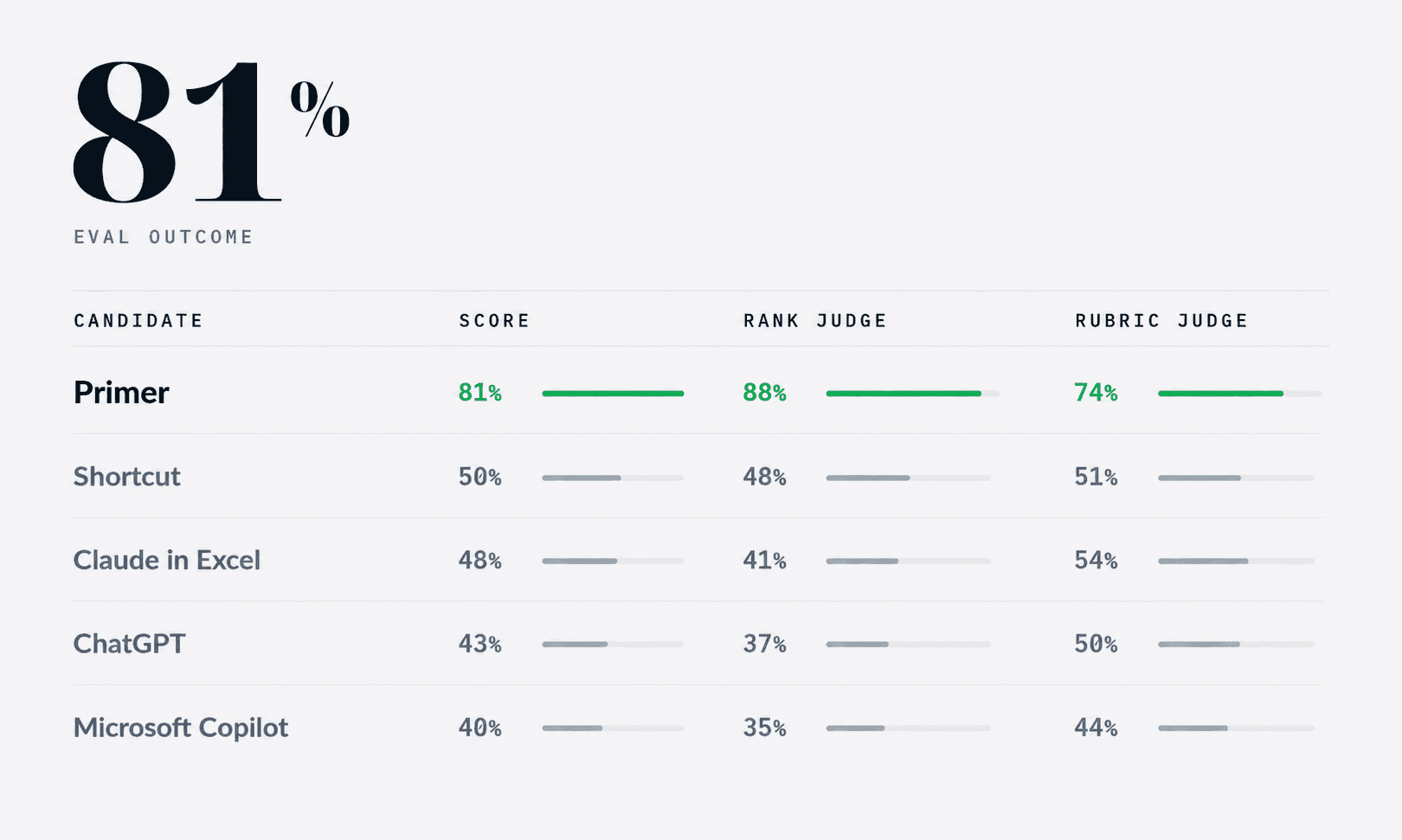
Primer ranked #1, materially ahead of the rest of the market. Modelling is one of the clearest tests of whether an AI agent can do real analyst work. It is not enough to produce something that looks like a spreadsheet. The model has to link properly, flow through the statements, use sensible assumptions and be easy to audit.

Ruggero Garguilo
Co-Founder, Head of Research
Featured
Wallstreetprep (WSP) did something commendable. They evaluated AI agents financial modeling on something realistic. Not a simple "unit test". It's a proper analyst task. As such, the results are difficult to assess deterministically - so they had actual analysts manually judge them. I loved the idea, and took it a step further: have AI agents assess that very task.
What I learned:
Optimise for AI comfort, not human: Excel may not be the best programming language for modeling
Relative scoring unlocks judgement: AI can act as judge, but give it all candidates side-by-side.
How do you assess "feel"? Next research area: can AI tell you how it feels to use a tool?
Set-up: A realistic task
Build a fully integrated, three-statement financial model in Excel for Apple using investment banking formatting and best practices. Show three years of historical results and four years of forecasts. Use the company's latest 10-K and Q4 press release for historical data and consensus estimates for forecasts. Insert comments and cite sources for both historical data and assumptions. Lay out the assumptions and three financial statements on one worksheet, with supporting schedules on separate worksheets as needed, and include a sources worksheet with links.
This is the ask. It's not "equity research", as it's asking the agent to use consensus rather than reasoning over forecast drivers. But, overall, it's a decent technical task.
Contenders
Shortcut AI
ChatGPT
Claude in Excel
Kudos to WSP, all excel models are available for download on their article page, so anyone can take a look.
New Entry: Primer
We did a lot of work on modeling at Primer, so I wanted to put it to test. However, Primer doesn't model in excel…
Tangent: Why Not Excel
The original contenders are creating and manipulating excel files directly. With Primer I took a different approach to modelling. I think it works better.
The Issue with excel
Excel is a effectively a low-code tool. Designed for humans rather than optimized for efficiency. The way formulas work, cells, everything is meant to make it easy for a human to interact with. However, AI agents change that. In fact, the Excel language becomes an impediment.
There's evidence of agents being strong at SQL, and generally using tools to perform tasks effectively. Great research by Braintrust would recommend a read.
Give the agent the right tools
So I gave Primer tools designed specifically for modelling. Using tools to work with a database, and taking away anything deterministic off the agent's plate. It can then focus on the key modeling choices, easily inspect formulas health, get hints on what to do if something isn't resolving, and so on. This has been a step-change in our modeling. And better yet, we can convert it deterministically to Excel afterwards. If of interest, I'll write in-depth about it in a separate article.
Bottom line is: instead of forcing the agent to use a language that makes it hard to model, give it one that makes it easy.
Evaluation Method
This is the key part. If real-life tasks are hard to score deterministically, you need real judges. So I automated WSP scoring using AI as a judge. Here's how.
Absolute Scoring
I took all the areas WSP assessed the models on, and gave that to GPT 5.5 Pro (the LLM-judge). The reason for 5.5 Pro is simple: if you need judgement in evaluating, use the strongest model available. For each excel model, I got 3 separate instances of GPT pro to evaluate it. 3 times to mitigate variance. But this wasn't enough.
Relative Scoring
Why Absolute Scoring isn't enough…in most realms
Last week I interviewed a candidate for a research role. After the interview I messaged my team saying: "He's a 8/10 - strong candidate. Background is not an exact fit, but really good potential".
The next day I interviewed another candidate…and wow - their background was a near-match with what I wanted. I went back to my team and said "He's a 9/10…but on that basis, yesterday's candidate was more like a 7/10"
A bit simplistic…but it's just tough to evaluate anything (or anyone) in silo, unless there is a "ground truth" to compare against with deterministic criteria.
Translated to evals: the models needed to also be "assessed" together by the same LLM-judge. Comparing them side by side, ranking them, and explaining the choices. Again, this was done by GPT5.5 Pro, 3 times.
Caveat
The WSP eval is from February, so Primer model has more up to date data. Judges were instructed to ignore data-availability differences.
Give the judge the right tools
I uploaded the Excels as queryable database representations, and gave the judge tools to explore them using SQL: a language it is comfortable with.
It could inspect sheet maps, cell values, formulas, formats, comments, and calculated-value diagnostics. This worked better than dumping whole workbooks into the judge's context.
Final results
Interestingly, the ranking was similar to WSP one, but with some differences.
For the headline score, I averaged the two judges:
50% absolute score: "how good is this model on its own?"
50% relative score: "how does it rank when compared side-by-side with the others?"
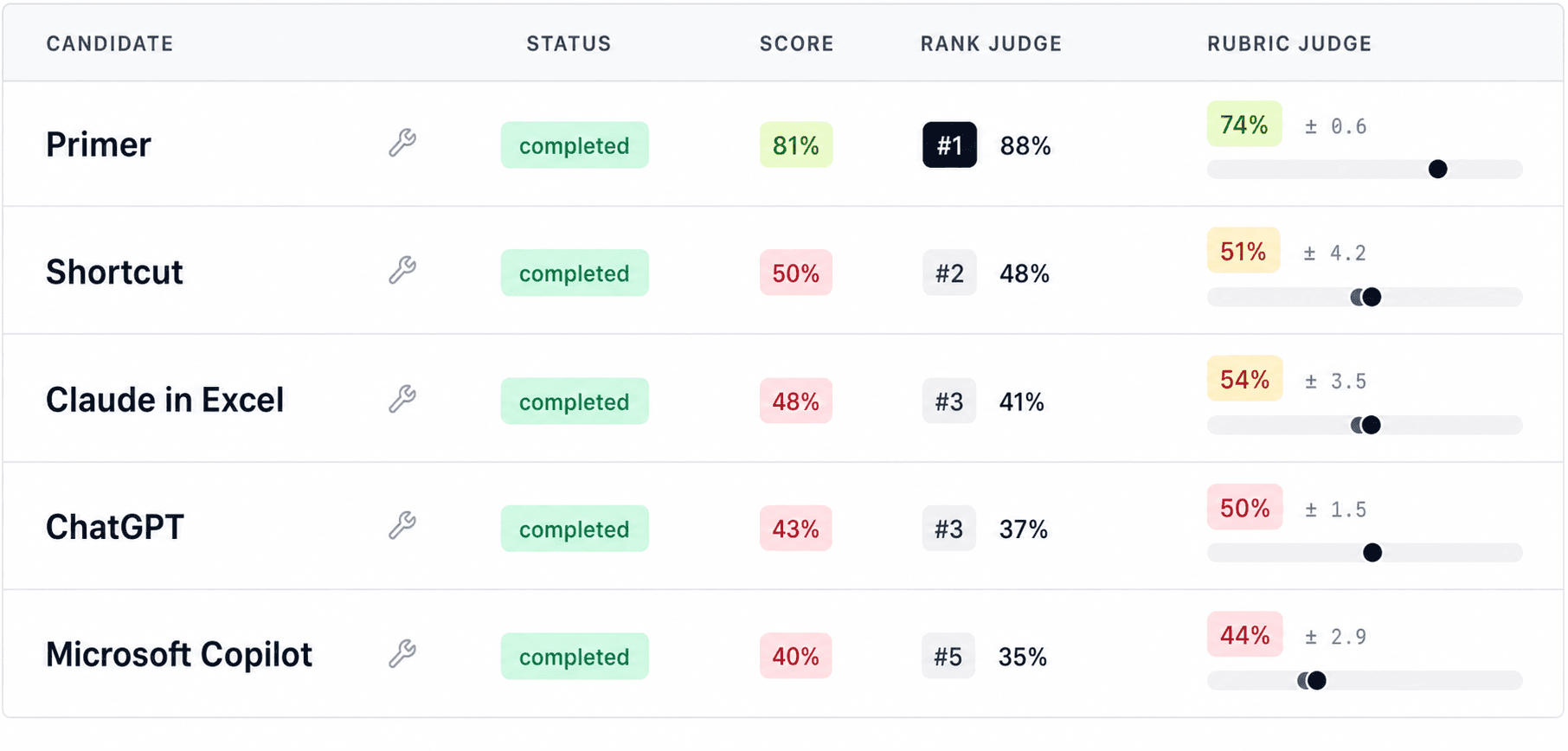
I wouldn't over-read the decimal points. The point is the ordering and the clusters.
Overall: Primer was materially ahead, Shortcut and Claude were close, and ChatGPT / Copilot were weaker.
Primer won because the model was more integrated. Assumptions flowed through the statements, the links were easier to audit, and the judge found fewer places where the model was being forced to balance.
Shortcut and Claude were in the middle. Shortcut looked more like a real working model: more formulas, more linked flow, and stronger model mechanics. But it also had problems: some historical cash flow items did not tie, and "other current assets" was effectively used as balancing line. Claude was cleaner and easier to review, which helped its absolute score, but had thinner modelling: weaker debt / cash / interest logic, and equity doing too much work to make the balance sheet balance.
ChatGPT and Copilot were weaker for different reasons. ChatGPT had decent sourcing and presentation, but the workbook mechanics weren't robust: hardcoding, formula issues and plugs. Copilot had even more missing pieces, especially around comments, source support, EPS/share logic, and statement integration.
The encouraging thing is that the AI judge inspected the actual workbook artifacts, traced formulas, looked for plugs, checked statement integration, and penalized models that only looked complete on the surface.
How does it feel?
However, 1 big piece is missing: feel.
What I couldn't replicate with the AI scoring was how using each app felt. This will be possible, especially given the recent improvements in app/browser use (e.g. Codex), but not yet something I've given much thought to.
Conclusion
It was a fun process, and I now have a repeatable system to evaluate financial modelling, which is great. But there are shortcomings too: those WSP models were from February, so a couple months out of date, which in AI-land is years. So we are due a refresher.
It would be fantastic to do this again with WSP and include Primer. Happy to give access any time!
Primer model attached here for transparency. And you can download the other candidates on WSP’s blog page.